Sort issues by type
When bugs, new features, and questions sit in one list, “how many bugs are left this week?” is hard to answer at a glance. Put a type on each issue with a label group, and you can filter, group, and split your board by type.
The built-in Type group
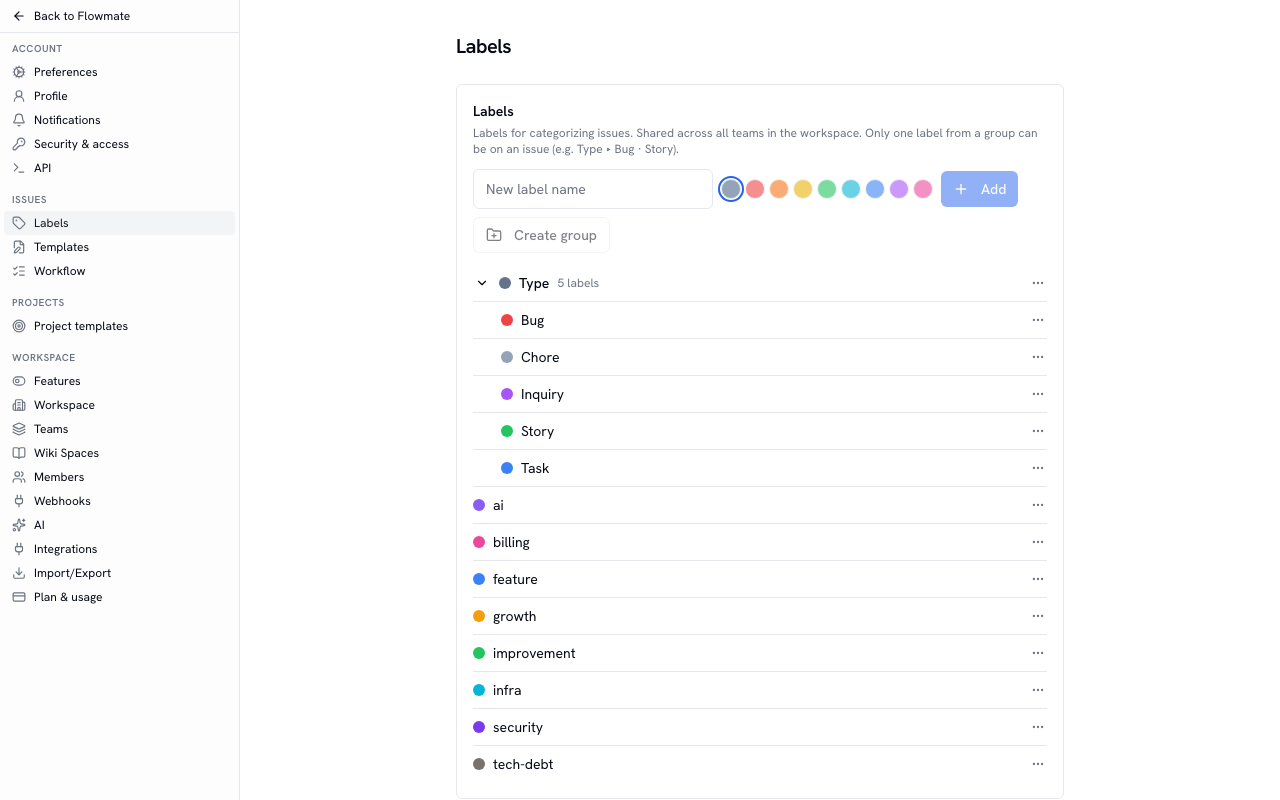
Section titled “The built-in Type group”Every workspace has a label group called Type, with five labels inside: Task · Bug · Story · Chore · Inquiry.
Only one label from a group can be on an issue. Add Story to an issue that has Bug, and Bug comes off as Story goes on. Who changed it is recorded on the issue’s activity tab.
When you import issues from Jira, each Jira Issue Type is attached as the label of the same name inside the Type group.
Put a type on an issue
Section titled “Put a type on an issue”- Pick it under labels when you create the issue.
- For an existing issue, use whichever is handy: the labels field on the issue page, the right-click menu on a list row, or the bulk-action bar that appears when you select several issues.
The label picker shows each group’s name as a heading, and you can pick only one label inside a group.
Filter and group by type
Section titled “Filter and group by type”- Filter — In Filter above the list, choose labels and then Type. Every issue with a label from the Type group is matched. Save as view keeps it, and later labels you add to the group are matched too.
- Group — Under Display, set Group to Label group › Type to group the list by type. The number next to each group is its issue count, and issues without a type gather under No labels.
- Board columns — In board view, set the columns to Label group › Type to get one column per type. Drag a card to another column to change its type, or to No labels to remove it.
Make your own label group
Section titled “Make your own label group”If you have another “only one per issue” classification besides type, create a label group for it. For example, an Area group with Frontend · Backend · Infra gives every issue exactly one area. Workspace owners and admins do this in Settings › Labels.
- Create group makes a group; then add new labels inside it.
- Move a label you already use into a group with Move to group from that label’s menu. If that would leave some issues with two labels from the group, you are asked to confirm and only the most recently added one is kept.
- Ungroup turns the labels inside back into standalone labels; labels already on issues stay as they are.